Overview
The Controller’s Office has implemented new spend and revenue category definitions for FY27. These updates support:
- Consistent category usage across the university
- Improved data quality for reporting, analytics, and compliance
- Greater visibility into downstream process impacts, for example:
- Trackable spend categories → asset registration
- 1099/1042‑S reportable spend categories → tax reporting (when used with a supplier designated as 1099/1042‑S)
Some key information on these changes:
- Spend category records within Workday include a definition in the Description field. Descriptions can be accessed through the Related Actions directly on the spend category, or the Spend Categories – FDM Values report.
- Revenue category definitions are published and maintained on the Controller’s Office website, as Workday does not currently support a Description field for revenue categories.
- New spend and revenue categories were created based on operational needs identified through multi-year data analysis.
- Select category names were updated to better reflect intended use.
- Categories with low utilization or redundancy were inactivated if there was no pending activity.
- Categories identified for inactivation with pending activity to clear are labeled 'DO NOT USE_'. The category that should be used instead is listed in the description field of these categories.
Spend Category Definitions and Changes
Spend category definitions are accessible in two different formats: within each spend category record and in a comprehensive list -
To view a definition from a transaction - Select the spend category (or search by keyword), then open Related Actions (three dots) next to the category name. The definition appears in the Description field.
For a full list of spend categories, definitions, and attributes - Run the Spend Categories – FDM Values report and refer to the Spend Category Description column. The report also indicates 1099/1042‑S tax reportability, if applicable. Note that tax reporting applies to transactions when both a tax-reportable spend category is used and the supplier is classified as 1099 or 1042‑S.
Users can also reference this job aid on the Administrative Resource Center for instructions on accessing the Spend Categories - FDM Values report and additional spend category attribute details that assist with category selection.
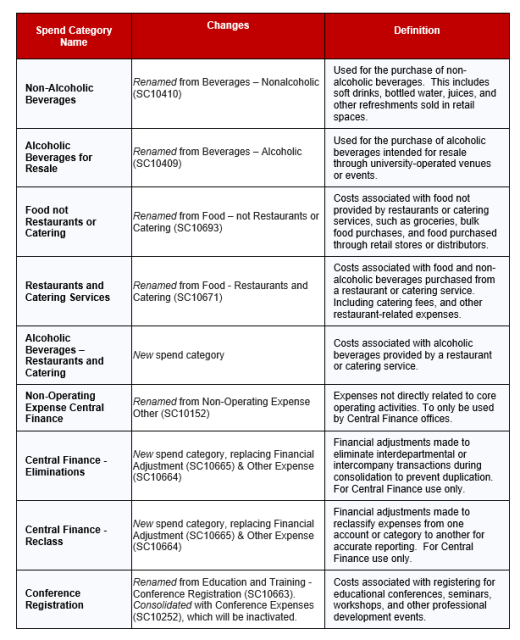
Key Spend Category Changes:
New Categories (were activated on 7/1/2026):

Other Notable Changes:
Food and beverage related spend categories will be updated to better distinguish food intended for consumption or resale from restaurant/catering purchases.
Additional adjustments have been made to address other operational needs.
Revenue Category Definitions & Changes
Revenue category definitions are available and will be maintained in this reference document. Once the document is downloaded, the definitions can be viewed in the Revenue Category Description column. This document also shows the hierarchy levels for each revenue category.
The Revenue Categories – FDM Values report is also available within Workday, but due to the system limitations, the description field cannot be added to this report.
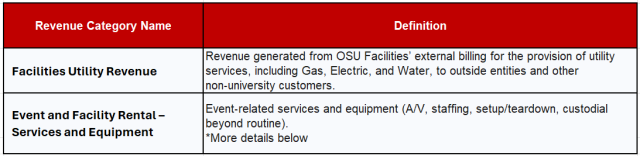
Key Revenue Category Changes:
New Categories (were activated on 7/1/2026):
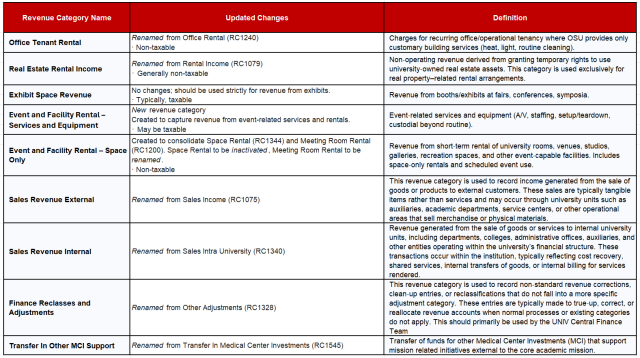
Other Notable Changes:
Rental revenue categories were restructured to better distinguish the nature of space rental activity for operational and managerial reporting purposes, including rental activity associated with earnings operations and other rental activity. These Workday revenue category distinctions are intended to support more accurate internal reporting and analysis; external financial statement operating and nonoperating presentation will continue to be determined under applicable accounting standards.
Additional revenue category adjustments have been made to address other operational needs.
Revenue Category Updates for Earnings Operations:
- FY27 is a transition year away from using RC1075 – Sales Revenue External (formerly called Sales Income).
- Because RC1075 is too broad for tax and other analysis, it should be used only for existing balances.
- Record new external revenue using the category that best describes the nature of the sale.
- External revenue updates: If you use RC1075 with Workday Sales Items or Nelnet, the Controller's Office will work with you to transition to a more specific category. These updates will be made centrally once the transition is complete.
- Internal revenue updates: No action required. Updates for Internal Service Providers (ISPs) were completed centrally effective 7/1.
- ISPs using RC1075 were updated to RC1340 – Sales Revenue Internal.
- ISPs which were referencing categories identified for inactivation were updated to the most appropriate active revenue category.
Full List of Category Name Changes & Inactivations
Through multi-year data analysis, the Controller’s Office identified a significant amount of spend and revenue categories that can be deactivated due to low usage or overlapping categories from the Workday implementation. Minor name changes are also listed in this document. A full list of these categories can be found here. Categories with no remaining balances or pending activity were inactivated July 1, 2026. For categories with outstanding balances or transactions that must clear before deactivation, the category name was updated to include "DO NOT USE_" and the category description identifies the appropriate replacement category. Once all activity has cleared, those categories will be permanently deactivated.
If you have any concerns or questions regarding alternative categories to use, please reach out to CTL-FDMRequests@osu.edu.